

One of the biggest causes for long deployment times is the build process. This process becomes exponentially more tedious the more environments your organization has. Our DevOps solution handles builds in a simultaneous manner allowing you to create builds for single production environments to development, testing, prod and many more in the same amount of time. These build artifacts are stored in easy to access (by IAM engineer) locations and organized by branch so your repository artifact size limits are never a hinderance and artifacts are always available for troubleshooting and debugging.

Your application artifact is ready when you are
The major reason for implementing a CI/CD pipeline is to remove the need for human interaction during the deployment process. We take this a step further by not only automating this process via one of our many built in deployment platforms but also take snapshots of the application before deployment so no changes are ever accidentally blown away.
Much like our Application Artifact Deployment we offer many options for ensuring your configuration files are properly uploaded to your application. We take it further by not just providing a holistic snapshot but snapshoting every live configuration artifact in your environment to a repository ready file. Our deployment also provides error checking and upload retry so you aren’t hunting for that one file that didn’t deploy correctly.

Object snapshotting in seconds

While IAM platforms like IdentityIQ attempt to lint xml artifacts during deployment, it can be time consuming, inaccurate, and narrow in its scanning scope. We’ve built a linting tool from the ground up that can process an entire mature IAM project repository in a fraction of the time and produce detailed reports highlighting the broken xml artifacts. These reports detail where the issue is in the xml artifact, the reason for the issue, a possible solution and when viewed from a repository pipeline result, a link to the xml in the web IDE for quick bugfixes.
The tool also has the ability to analyze llinting errors and automatically open SCRUM/Kanban board stories containing the error in question and provide a point value to the story based on the analyzed complexity. This ensures a IAM team never loses sight of small remediation tasks…
and the best part about this tool is that it only takes a single line to implement it to your pipeline yaml!
Although code checking may seem like a broad term, our code check tool provides a broad range of functionalities that help to enforce good coding patterns and catch those warnings that become errors in future product releases!
Some of the many features include:
- Missing token checking
- Comment checking
- Naming Convention checking
- Java import wildcard checking
- Plain text password checking
- Log Level checking
- Workflow Trace Checking
- Deprecated class checking
And more…
All these features include reporting features which like XML linting can be viewed locally, within the repository, or via automated story creation!
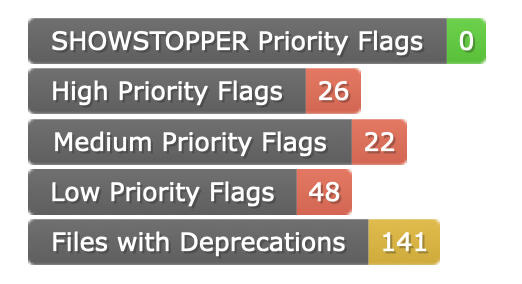
With this many features it can be difficult to navigate the many reports and outputs. Our DevOps solution eliminates this usability issue and automatically handles repository badging complete with dynamic linking to the reports you’d like to see. With these badges you can have insight to the health of your IAM project at a glance.

A common argument we hear when it comes to onboarding new apps is “how do we test if we only have a prod environment?” Our DevOps solution offers a disconnected testing harness capable of running actions such as provisioning events without touching your sensitive environment. This also means there is not need for testing cleanup once the QA team has finished their reports!
Our solution can perform tedious tests that would usually require a developer interfacing with the IAM UI to trigger specific events from a remote build server or engineer’s workstation and derive easy to read text based results showing a clear pass or fail with automated suggestions to help a engineer resolve a found issue. This feature also gives the developers to develop their own unit tests using the IAM platforms preferred scripting language. In the case of IdentityIQ, a developer can simply write a BeanShell rule in our popular open-source rule runner plugin and feed this rule into the pipeline as a unit test to be ran before and/or after deployments. The testing possibilities are only limited to your creativity!

Some IAM teams may require QA to capture explicit screenshots of the environment or direct usage of the UI during tests as a part of their testing procedure. We offer flexibility in what UI based testing frameworks works best for your from widely utilized web testing frameworks like Selenium to more cutting edge frameworks like Cucumber or PyAutoGUI. This ensures your QA team doesn’t need to learn the IAM platforms preferred scripting language or limit them to a single testing platform.